Building a SaaS product is rarely about building a few screens and connecting them to a database. The difficult part starts when the product needs to behave like a real system: tasks need reliable state transitions, users need secure authentication, notifications need to work independently, background work should not block the main application, and the entire platform needs to be deployed without turning infrastructure into an unnecessarily expensive problem.
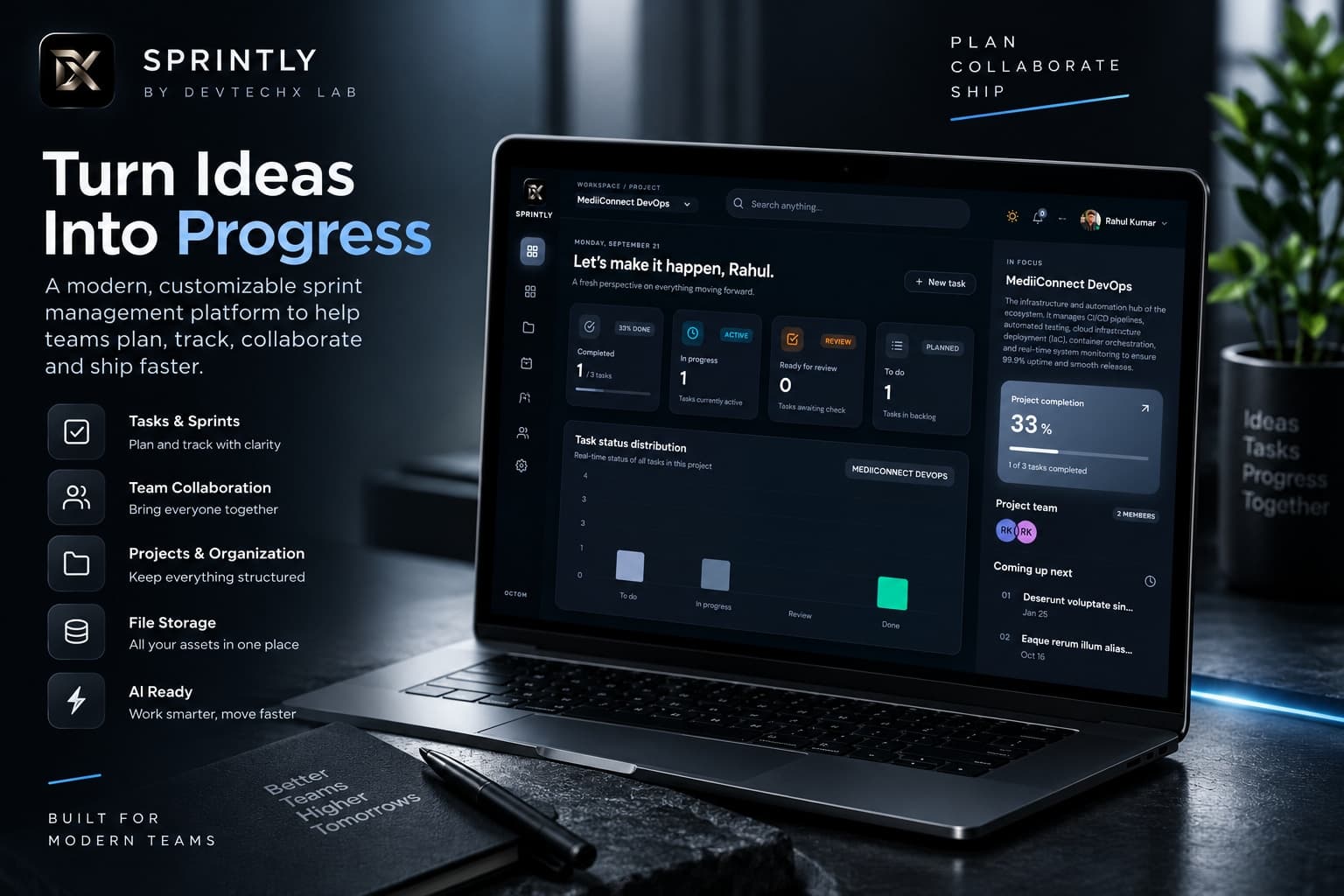
Sprintly became an exploration of exactly those problems. I built it as a developer-focused project and sprint management platform where organizations can manage projects, tasks, members, files, notifications, integrations, and engineering workflows from a shared workspace.
What started as a product idea became a much deeper engineering exercise. While building Sprintly, I explored independent background workers, email processing, web notifications, task-management architecture, TOTP-based security, Docker, deployment strategies, and the trade-offs involved in running a SaaS product on a limited infrastructure budget.
What Is Sprintly?
Sprintly is a project and sprint management SaaS designed around the idea of making engineering work easier to organize inside an organization.
Instead of treating project management as an isolated task board, I designed the product around an organization and workspace model. Members can work across projects, create and manage tasks, organize sprints, monitor progress, collaborate through comments and notifications, manage files, and connect external developer workflows.
The platform includes concepts such as:
- Organizations and workspaces
- Projects
- Sprints
- Tasks
- Task priorities and due dates
- Board and list workflows
- Project members
- Comments and notifications
- Files and project storage
- Authentication and authorization
- TOTP-based two-factor authentication
- API key management
- GitHub connectivity
- Webhooks
- Background jobs
- AI-assisted capabilities
Building these features independently forced me to think about the platform as a system rather than a collection of frontend pages.
Why I Built It
One of the things that repeatedly bothered me while working on software projects was how fragmented engineering work can become.
A team may have a project management tool for tasks, another application for communication, another system for files, GitHub for source control, and separate infrastructure for notifications and automation.
I wanted to explore what would happen if these workflows were designed around the organization's actual work instead.
The goal wasn't simply to reproduce a traditional Kanban board. I wanted to build a foundation that could eventually support projects, sprints, members, collaboration, security, integrations, automation, and developer operations inside one coherent workspace.
Designing the Organization and Workspace Model
One of the first architectural decisions was to make the organization the foundation of the product.
Users should not exist only as isolated accounts. They should be able to belong to an organization, participate in projects, and interact with work according to their permissions and responsibilities.
This created a hierarchy similar to:
Organization
    |
    +-- Members
    |
    +-- Projects
    |     |
    |     +-- Tasks
    |     +-- Sprints
    |     +-- Comments
    |     +-- Files
    |     +-- Activity
    |
    +-- Integrations
    |
    +-- Security
    |
    +-- Notifications
    |
    +-- Background Jobs
This model gave the rest of the application a consistent context. Instead of asking only "which user owns this task?", the application can reason about which organization, project, and members are involved.
That distinction becomes particularly important when building SaaS products where multiple users and teams need to share the same workspace without exposing data across organizational boundaries.
Building the Task Management System
The task system is the center of Sprintly's product experience.
I wanted tasks to represent more than a title and description. A useful engineering task needs enough information to support planning, execution, prioritization, ownership, and progress tracking.
The task workflow therefore includes concepts such as:
- Task title and description
- Status
- Priority
- Due date
- Story points
- Project association
- Sprint association
- Members and ownership
- Comments and activity
The same underlying task information can then be presented through different interfaces.
The board view is optimized for moving work through stages, while list and planning-oriented views provide different ways to understand the same project state.
This was an important product lesson for me: a good data model should not be tightly coupled to one UI representation.
Why I Separated Background Work From the Main Application
One of the more important architectural explorations during Sprintly was separating background work from request-response application logic.
Not every operation needs to happen while a user is waiting for an HTTP request to complete.
Tasks such as email delivery, notification processing, integration events, scheduled operations, and other asynchronous workflows are better candidates for background processing.
Instead of making the main application responsible for everything, I explored an architecture where background processing can operate independently.
User
  |
  v
Web Application
  |
  +---- Immediate response
  |
  +---- Create background job
              |
              v
        Worker Process
              |
       +------+------+
       |      |      |
       v      v      v
     Email  Events  Notifications
This separation provides an important architectural boundary. The application responsible for serving users does not have to perform every potentially slow operation itself.
It also makes the system easier to evolve because worker-specific logic can be changed without restructuring the entire web application.
Building an Independent Email Worker
Email processing was one of the areas where this separation became especially useful.
Sending an email can involve template rendering, provider communication, retries, failure handling, and logging. None of those operations need to block the user's primary application request.
I therefore explored treating email delivery as independent background work.
The conceptual workflow became:
Application
     |
     | create email job
     v
Background Job Store / Queue
     |
     v
Email Worker
     |
     +---- Load template
     |
     +---- Prepare payload
     |
     +---- Send
     |
     +---- Record result
     |
     +---- Retry / handle failure
This approach also changed how I thought about reliability. A worker should assume that external services can fail. Network requests can timeout, an external provider can reject a request, and a process can terminate halfway through an operation.
Background processing therefore needs explicit thinking around retries, failure states, idempotency, logging, and operational visibility.
Web Notifications Without Blocking the User Experience
Another interesting part of Sprintly was implementing application-level notifications.
When something happens inside a workspace, users should not have to refresh every page to discover it.
Examples include:
- A new task being created
- A comment being added
- Work being assigned
- Project activity occurring
- Other workspace events requiring user attention
This introduced another useful separation between the event that happens and the notification that eventually reaches the user.
Application Event
       |
       v
Notification Creation
       |
       v
Notification Storage
       |
       +----------------+
       |                |
       v                v
   Web UI          Background
   Update           Processing
The key idea is that the notification system should not become tightly coupled to every feature in the application.
A reusable event-driven approach gives future features a consistent way to produce user-visible activity.
Learning TOTP and Two-Factor Authentication
Security was another area where building Sprintly became a learning exercise rather than simply implementing a checkbox labelled "2FA."
I implemented exploration around time-based one-time passwords, commonly referred to as TOTP.
The basic authentication flow looks like:
User
  |
  | Email + Password
  v
Authentication
  |
  | 2FA enabled?
  v
TOTP Verification
  |
  | Valid code
  v
Authenticated Session
A TOTP system introduces another secret that must be protected and associated with the user's authenticator setup.
The important lesson for me was that authentication is not simply about checking credentials. It involves account state, secrets, session handling, recovery considerations, rate limiting, authorization, and careful treatment of security-sensitive information.
Sprintly also includes organization and member concepts, which made authorization equally important. Authentication answers "who are you?", while authorization answers "what are you allowed to do?"
API Keys, Integrations and Developer Workflows
Sprintly is intended to eventually connect with the tools developers already use, so integration architecture became another important part of the product.
The platform includes areas for GitHub connectivity, webhooks, API keys, and background jobs.
This led me to think about integrations as independent boundaries rather than putting provider-specific logic throughout the application.
A webhook, for example, should be treated as an external event entering the system. The application should validate it, interpret it, and then trigger whatever internal workflow is appropriate.
This approach makes integrations easier to extend because adding another provider doesn't necessarily require changing the core project and task architecture.
Docker: Making the Application Portable
As the product architecture became more complex, containerization became increasingly useful.
Docker provides a consistent environment for running application services without relying entirely on the configuration of the machine hosting them.
This becomes especially useful when a system contains multiple components, such as:
- Web application
- Backend services
- Worker processes
- Background jobs
- Supporting services
Instead of thinking only about "deploying the application," I started thinking about deploying reproducible services.
That shift was valuable because the same containerized application can be tested locally and then moved into a production environment with fewer environment-specific assumptions.
Deploying With Render and Vercel
Another practical challenge was infrastructure cost.
While building an independent SaaS product, paying for a large cloud architecture before the product has meaningful usage does not necessarily make sense.
I therefore explored using Vercel and Render to keep the deployment relatively simple and cost-conscious.
Vercel provided a convenient environment for the frontend and web application experience, while Render could be used for backend and service-oriented workloads.
The important lesson wasn't that one platform is universally better than another. It was understanding that infrastructure should match the current stage of a product.
A small product does not necessarily need an elaborate infrastructure stack immediately. The architecture should leave room to scale while keeping the operational burden and cost appropriate for the current stage.
Cost vs Architecture: What I Learned
One of the most useful lessons from Sprintly was learning to distinguish architectural quality from infrastructure complexity.
A system can have clean boundaries, background workers, authentication, notifications, integrations, and containerized services without immediately requiring a large collection of expensive infrastructure services.
At the current stage, I wanted to keep the deployment practical while preserving the architectural boundaries that would make future scaling possible.
That means making deliberate decisions about what needs to be independent now, what can remain simple, and what should be designed so it can be extracted or scaled later.
This was one of the biggest differences between building Sprintly and building a simple personal project: I had to think about the cost of every architectural decision as well as its technical consequences.
Designing the Product Experience
I also didn't want Sprintly to feel like a collection of administrative dashboards.
The interface was designed around a workspace experience where users can quickly understand what is happening and move between projects, tasks, planning, files, members, and other parts of the organization.
The dashboard provides a high-level view of progress, while the task board provides a more execution-oriented experience.
The project screen provides context around individual work, and the timeline provides another perspective for understanding upcoming activity.
I also explored dark and light visual systems so the product could feel like a polished developer-oriented SaaS product rather than a basic internal tool.
The Architecture Became the Real Product
One of the biggest things I learned while building Sprintly is that the visible UI is only one layer of a SaaS product.
The actual product is the interaction between the different systems behind those screens.
                    Sprintly
                       |
        +--------------+--------------+
        |              |              |
     Workspace       Projects       Security
        |              |              |
     Members        Tasks/Sprints    2FA/RBAC
        |              |
     Activity       Notifications
                       |
                 Background Jobs
                       |
              +--------+--------+
              |                 |
           Email            Integrations
                                |
                          GitHub / Webhooks
Every new feature creates relationships with other parts of the system. Adding notifications affects events. Adding members affects authorization. Adding integrations affects API security. Adding background processing affects reliability and deployment.
Thinking in those relationships helped me move from feature-level development toward platform-level engineering.
What I Would Do Differently
If I were starting Sprintly again, I would introduce stronger observability and operational tooling earlier in the development process.
As more independent services and asynchronous workflows are introduced, understanding what is happening inside the system becomes increasingly important.
I would also define some of the internal event and background-job contracts earlier. Doing that sooner would make it easier to add new workers, integrations, and notification types without creating unnecessary coupling.
This is one of the reasons I like building products from scratch: every architectural shortcut eventually becomes a lesson.
What Sprintly Means to Me
Sprintly is more than a project management interface in my portfolio.
It became a practical environment for exploring how a modern SaaS product can be designed from the ground up.
I worked through problems involving organization architecture, task management, asynchronous processing, independent workers, email delivery, web notifications, TOTP security, API keys, integrations, Docker, deployment, and infrastructure cost.
More importantly, I learned to think about the relationship between these systems rather than treating each feature independently.
The product is still evolving. I am continuing to explore automation, developer integrations, AI-assisted workflows, richer project intelligence, and additional capabilities that can reduce operational friction for teams.
Final Takeaway
Building Sprintly reinforced something I have learned repeatedly while developing software: the interesting engineering problems usually begin after the basic feature works.
A task can be created in seconds. Designing the system so that tasks, organizations, permissions, notifications, workers, integrations, security, and deployments continue working together is the real challenge.
Sprintly gave me an opportunity to explore those problems end-to-end and continue moving from simply building features toward designing complete software systems.
And that is ultimately what I want to keep doing: building practical software that makes complicated work simpler for the people using it.
Explore the Project
Sprintly is part of my independent product development work through DevTechX Lab.